QR Code Workflow for School Photography
Automate photo assignment. Shoot the card, shoot the child, upload. No scanner hardware and no labels from the lab.
Without cards
The Nightmare of Manual Image Sorting
Manually sorting hundreds of student photos into folders after the picture day wastes time and nerves:
Hours of comparing pupil lists with the portraits you shot.
Ordering labels from the lab, waiting for them and handing them out correctly on the day.
Lost or swapped slips lead to wrong assignments and complaints.
High cost for barcode scanners or radio transmitters on the camera.
With Pixalo
Modern, Digital Photo Matching
With Pixalo your camera and a normal printer are enough. The card in the frame assigns every photo automatically on upload.
Pixalo Mobile App
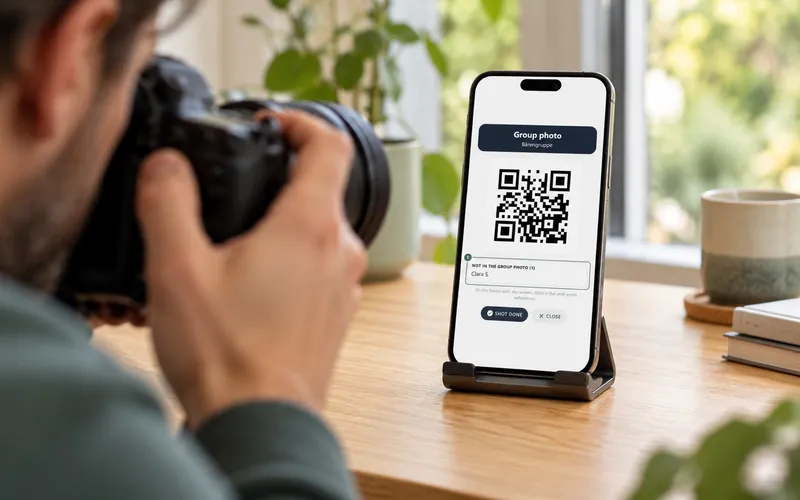
Available for iOS and Android. Child list in card order, cards on the display and every new order as a notification.
The card separates the sections
Everything between two cards belongs to the child on the first card. The group card comes before the group photo.
Instant QR Cards
Generate password cards automatically. Parents scan to access their private, secure gallery.
Workflow
How the picture day runs with Pixalo
No paperwork from the lab, no expensive extra devices. Print, shoot, upload.







- 1
Print the cards
Print the job’s cards in the dashboard, one per child plus the group card. Normal paper is fine.
- 2
Shoot the card, then the child
One shot of the card, then carry on as usual. For the next child, the next card.
- 3
Upload & Auto-Sort
Upload everything in one go. Pixalo recognizes the cards, builds the sections and shows open cases in the control view.
Benefits
Your Benefits at the Shoot
Experience a smooth workflow on-site that delights teachers, educators, and parents.

Sorting happens on upload
No manual dragging, no folder creation. Spend your time shooting instead of sorting.
No scanner hardware
Save on expensive accessories. Neither barcode scanners nor radio transmitters on the camera are needed.
Privacy through separate access
Only parents with the unique access code can view the child’s photos. Hosted securely on German servers.
Easy Sibling Match
The app allows grouping sibling shots so parents can order all their children's photos in a single checkout.
How this works in practice
Step-by-step guides from the Pixalo documentation.
FAQ
Frequently Asked Questions
Answers to the most important questions about our software.
No problem. Those photos land under Unsorted and stay invisible to parents. In the control view you select them and assign them with two clicks. The app can also show a missing card on the display so you can photograph it on set.
No. The cards come from your dashboard and print on normal paper. You design layout, logo and text yourself in the card designer, even the evening before.
No, the app needs internet because it loads child lists and cards straight from your account. The printed QR cards need no signal: if reception at the school or nursery is weak, simply shoot with the paper cards.
Yes, the Pixalo App is free to download for both Apple iOS devices (App Store) and Google Android devices (Play Store).
Try it yourself
Start commission-free today
* Standard transaction fees from payment providers (Stripe/PayPal) may apply.
- Used by professional photographers – from weddings to schools and daycares
- 0% commission & direct payouts to your account
- Your own brand, logo, and domain (White-Label)
- Hosted in the EU: AWS data center in Frankfurt