
The School Photography App for Picture Day
The free Pixalo app for iPhone and Android: the child list in the same order as your cards, cards on the display and every new order as a notification.
iPhone · iPadAndroid
Without the app on the day
Challenges Without a Mobile Picture Day Solution
A forgotten card: without a spare, the photo is not assigned to any child on the day and has to be sorted by hand later.
Consent on paper: who may only be in the group photo is written on a list in a folder, not where you are shooting.
No overview on the day: which children have been photographed and who is still missing?
Paper lists go out of date: parents often change their consent shortly before picture day.
Orders only at your desk: on the road you cannot see whether the gallery is selling.
In the app
Your Advantages with the Pixalo App
The app is your assistant on the day and on the road. You still upload photos in the dashboard, and the card in the picture does the assigning.
Card on the Display
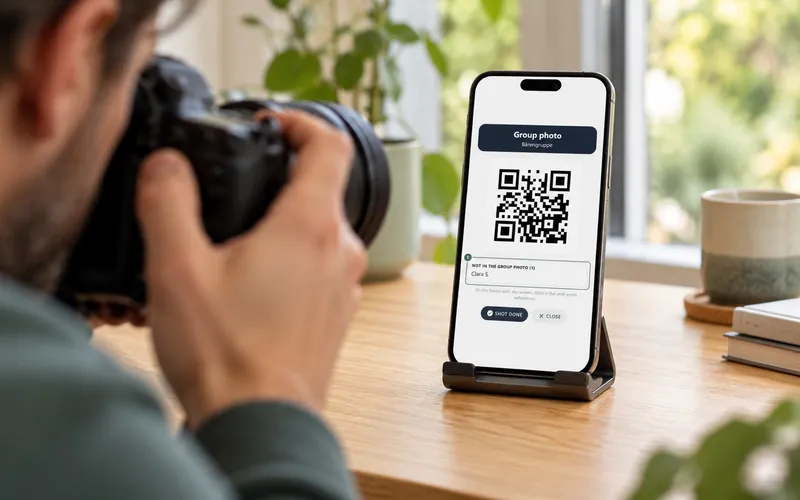
One tap on Card turns your phone into the photo card. Photograph the display like a printed card. The result is the same.
Child List in Card Order
Children appear in the same order as the printed cards. Tap the number to tick a child off, and the top shows how many have been photographed.
Consent at a Glance
Do not photograph, group photo only, no group photo: the note sits right under the name and is always up to date.
Orders as Notifications
Every new order arrives as a notification on your phone. The app shows revenue plus open and completed orders.
App and dashboard
What the App Does and What Stays in the Dashboard
The app reads data and creates things. Cleaning up, uploading and your shop stay in the dashboard. Both work directly with the same account.
| Task | Pixalo app | Dashboard |
|---|---|---|
| Photo cards | A child's or group card on the display | Print cards as a PDF |
| Internet | Required, the app loads groups and cards straight from your account | Required |
| Photo assignment | Done by the card in the picture, not the app | Upload photos, assignment runs automatically |
| Children and groups | View, tick off, add new children | Create, edit and delete |
| Jobs | Create a new job on the go | All jobs, including client galleries |
| Orders | Overview and a notification for every new order | Edit, refund, ship |
| Devices | iPhone, iPad, Android phones and tablets | Browser on a computer |
How this works in practice
Step-by-step guides from the Pixalo documentation.
Questions
Frequently Asked Questions
Answers to the most important questions about our software.
The Pixalo app is available for iPhone and Android, including iPad and Android tablets. It is free and included in every plan. You sign in with the same login as the dashboard.
The card does the assigning, not the app. You photograph the card, then the child. On upload every photo lands with the right child. The app helps with the child list and shows a card on the display when a printed one is missing.
No, the app needs internet because it loads groups and cards straight from your account. If the signal on site is weak, bring the printed cards. They always work.
Yes, on your phone. Tap the number to tick a child off, and the top of the group shows how many have been photographed. The tick is a reminder on that device. Which photos belong to whom is decided only by the card in the picture.
No. You need your camera, the printed cards and, if you like, your phone with the app. You do not need a scanner or a special reader.
Get started
Start commission-free today
* Standard transaction fees from payment providers (Stripe/PayPal) may apply.
- Used by professional photographers – from weddings to schools and daycares
- 0% commission & direct payouts to your account
- Your own brand, logo, and domain (White-Label)
- Hosted in the EU: AWS data center in Frankfurt