
What's new

Pixalo gets better every month.

Every new feature shows up here as soon as it is live. With the date, a short explanation and a link to the guide. Many of them were requested by photographers.

Latest: November 8, 2026/16 updates

Every update with a date

Newest first. Each card explains what changes and where to find it.

November

2026

8 updates

  1. Shop & sales

    Products only for portrait or landscape photos

    A passport photo doesn't work on a landscape shot. You now choose which format each product is for. Parents only see it on matching photos.

    • Passport and job application photos come set to portrait in the product templates
    • Applies in the cart, in packages and at checkout
    • Regular prints stay open, the lab rotates them for you

    PIXALO · 11/08/2026 · Nº 016 · Shop & sales
  2. Shop & sales

    Christmas cards with the child's photo in your shop

    Parents can now order Christmas cards and photo calendars with their child's photo. They just pick the design. Pixalo places the photo and creates the print-ready file. On its own or as part of a package.

    • Three Christmas designs and three photo calendars
    • Greeting in your shop language or your own text
    • Printed automatically by your lab, or as a print file without one
    Christmas cards with the child's photo in your shop
    Requested by photographers

    PIXALO · 11/07/2026 · Nº 015 · Shop & sales

  3. Shop & sales

    Book a session right in online registration

    Offer a session as part of online registration, for example a family shoot in the afternoon after picture day. Parents register their child and book in the same step. The appointments module is fully built in. So you sell more.

    • Open times come straight from your appointment calendar
    • New: time slots from 5 minutes
    • New: offer sessions on single days
    • The booking is confirmed as soon as parents verify their email
    Requested by photographersRead the guide

    PIXALO · 11/07/2026 · Nº 014 · Shop & sales

  4. Shop & sales

    Prints and all photos digital in one package

    You can now add “All photos digital” to a regular package. Parents get prints plus every photo of their child as a download, for one package price.

    • One switch in the package, plus your digital product
    • Protection against buying the same digital twice
    • Group photos stay out when “Prints only” is on

    PIXALO · 11/07/2026 · Nº 013 · Shop & sales

  5. Shop & sales

    Products only for individual or group photos

    On school and preschool jobs, you decide per product whether it belongs to individual photos, group photos or all photos. Parents only see the products that fit each photo.

    • Large class photo prints only on the group photo
    • Also applies in packages, except “All photos digital”
    • Existing products stay open for all photos

    PIXALO · 11/03/2026 · Nº 012 · Shop & sales

  6. Shop & sales

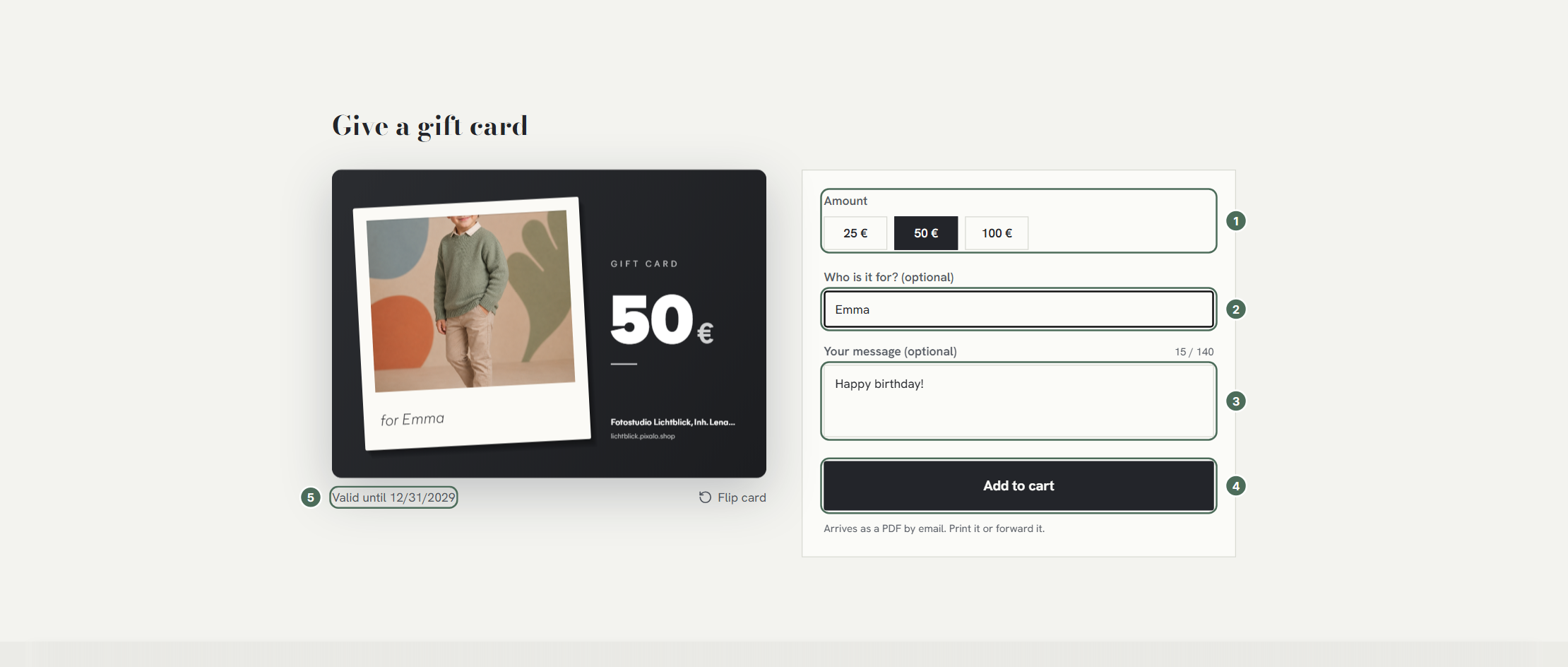
    Sell gift vouchers in your own shop

    Sell gift vouchers right in your shop, for example for the holidays. Customers pay online and redeem the voucher later with their order.

    • Set amounts and validity yourself
    • Voucher card as a PDF with your photo
    • Remaining balance stays for the next order
    Sell gift vouchers in your own shop

    PIXALO · 11/02/2026 · Nº 011 · Shop & sales

  7. Gallery & picture day

    See who opened their gallery

    The student list now shows which families have already opened their gallery. So you only remind the ones who haven't looked yet.

    • Status per student, right in the list
    • Counts the family's first visit
    • Older jobs are marked as incomplete
    Requested by photographers

    PIXALO · 11/01/2026 · Nº 010 · Gallery & picture day

  8. Studio & admin

    Read class lists from a photo or PDF

    Take a photo of the class list or upload a PDF. Pixalo reads names and classes, even from scanned lists and photos taken at an angle.

    • iPhone photos (HEIC) and scanned PDFs
    • Rotated photos are turned upright automatically
    • Long lists with over 100 children, too

    PIXALO · 11/01/2026 · Nº 009 · Studio & admin

October

2026

8 updates

  1. Shop & sales

    Choose your payment methods

    You decide which payment methods your shop offers through Stripe. Turn off Klarna or other methods with one click.

    • Setting under Payments > Stripe
    • Card and Link always stay on
    • Applies to every new order right away
    Requested by photographers

    PIXALO · 10/25/2026 · Nº 008 · Shop & sales

  2. Shop & sales

    Sibling discount, fully automatic

    When parents buy for several children, the discount applies by itself. You set it up once under discount codes, for example from two access codes.

    • Set from 2 to 5 access codes
    • If several discounts apply, the family gets the better one
    • Ready-made sibling note on the QR card
    Requested by photographers

    PIXALO · 10/23/2026 · Nº 007 · Shop & sales

  3. Photo lab & products

    Deliver to the school without a lab

    Printing yourself? Decide per job whether orders go to the school or to the family at home. The packing list sorts everything by class.

    • Delivery to the school or to the home
    • Packing list as a ready-made document
    • Shows up when no lab is connected
    Requested by photographers

    PIXALO · 10/23/2026 · Nº 006 · Photo lab & products

  4. Studio & admin

    Duplicate uploads are caught

    If you upload a photo twice by mistake, Pixalo skips the copy. So no picture shows up twice in a gallery.

    • Matched by file name and file size
    • Skipped files are marked “Already uploaded”
    • Copies don't count against your storage

    PIXALO · 10/12/2026 · Nº 005 · Studio & admin

  5. Gallery & picture day

    Watermark library

    Save several watermarks as presets and pick the right one for each job. Text or logo, tiled or in a fixed spot.

    • Text or your own logo
    • Tiled or in seven positions
    • Angle, color, band and line pattern adjustable

    PIXALO · 10/11/2026 · Nº 004 · Gallery & picture day

  6. Photo lab & products

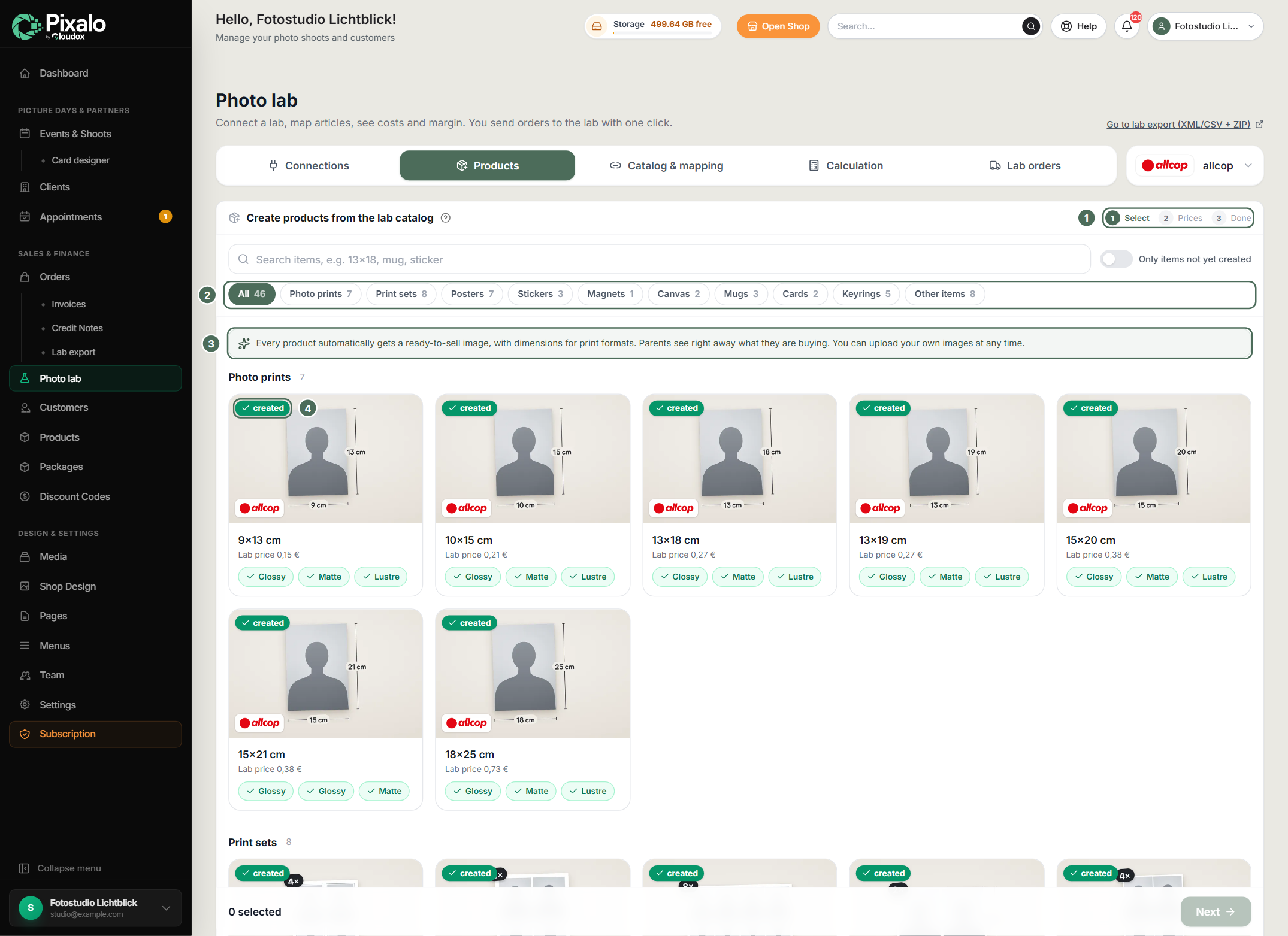
    Orders straight to the photo lab

    Connect your shop to the photo lab allcop. Create products straight from the lab catalog and send orders to the lab with one click. No retyping, no export.

    • Create products from the lab catalog, with a ready product image
    • Pricing view shows lab price and your margin
    • Status of every lab order in the dashboard
    Orders straight to the photo lab

    PIXALO · 10/07/2026 · Nº 003 · Photo lab & products

  7. Gallery & picture day

    Group photos as prints only

    For each job you can decide that group photos are not sold digitally. Parents can then order them only as prints.

    • One switch per job
    • Group photos are left out of every digital package
    • Prices stay the same
    Requested by photographers

    PIXALO · 10/07/2026 · Nº 002 · Gallery & picture day

  8. Shop & sales

    Pick a photo for every print in a package

    If a package has several prints in the same size, parents choose a separate photo for each one. For example two different shots in 5x7.

    • One slot per print in the cart
    • Package and price stay the same
    • Lab export and downloads follow every choice
    Requested by photographers

    PIXALO · 10/07/2026 · Nº 001 · Shop & sales

Your idea

The next update could be yours.

Many updates start with an email from a photographer. Tell us what you miss on picture day.

8/16

updates on this page came straight from photographers' requests.

Questions

Common questions about updates

How new features reach your account.

No. Pixalo runs in your browser. New features are in your account right after the update. No download, no restart.

At the top of the dashboard, under “New”. A dot shows when something has changed since you last looked.

New features are usually settings you switch on yourself. Your shop, prices and jobs stay the way you set them up.

Yes. Write to us through the contact form or by email. Many updates on this page started that way.

Get started

Try Pixalo on your next picture day.

* Standard transaction fees from payment providers (Stripe/PayPal) may apply.

  • Used by professional photographers – from weddings to schools and daycares
  • 0% commission & direct payouts to your account
  • Your own brand, logo, and domain (White-Label)
  • GDPR-compliant hosting in Germany